Parental Control - Kidslox
- 4.0
- Rating
- 1.00M
- Installs
- Free
- Price

 Analysis by App-foxy
I look at parental-control apps as practical household tools rather than magic solutions. They can create boundaries, but they cannot replace a conversation about sleep, schoolwork, privacy, and responsible device use. In that context, Parental Control - Kidslox is a focused parenting app from Kidslox, Inc. that brings screen-time limits, app and game blocking, and monitoring controls into one place. I found its strongest appeal in families that want a clearer routine without constantly taking a child’s phone away.
The app is free to install and is rated for Everyone, which makes it approachable for households with children at different ages. It has grown into a widely used service, with more than a million installs, a 4.1 average from roughly 36 thousand ratings, and about 1.7 thousand written reviews. Those figures suggest a mature product with a substantial user base, although they should not be mistaken for a guarantee that its approach will suit every family.
How Kidslox feels in everyday family use
I find Kidslox most useful when a household treats device limits as a shared routine rather than a switch one parent flips in isolation. This section looks at how its controls can fit everyday use, including the small practical choices that make rules easier to follow. From there, I’ll turn to the boundaries worth deciding before setup.
You May Also Like

 Blood Strike: 2.5 Anniversary
Blood Strike’s Loadouts Turn Every Drop Into a Tactical Gamble
A close look at Blood Strike’s custom loadouts: how fast access to signature weapons reshapes its battle royale rhythm, rewards preparation, and narrows the gap between fights.

 Pandora - Music & Podcasts
Pandora’s Music Is Easy to Start, but Harder to Recover
Pandora’s strength is its low-effort path from a seed to a station. Its weak spot is how much confidence it asks you to place in connection, setup, and quiet recovery.

 8 Ball Pool
 Is Built on Rivalries, Rematches, and Routine
A close look at the rivalries, rematches, shared routines, and unanswered safety questions that turn a quick pool match into a persistent mobile community.

 Samsung Music
’s Quiet Strength Is Playing What You Already Own
Its reach comes less from spectacle than from dependable access to a personal library. That simplicity is both the app’s strongest retention engine and its ceiling.

 AccuWeather: Weather Radar
AccuWeather Review: A Quick, Clear Forecast for Everyday Decisions
For everyday plans, the best forecast is the one you can understand quickly. AccuWeather makes rain timing, radar, and local conditions easy to act on, with a few trade-offs.

 Hill Climb Racing
Why Hill Climb Racing Still Turns Crashes Into One More Run
A tiny car, a bumpy hill and one more upgrade: Hill Climb Racing keeps resurfacing because its simple chaos makes every near-miss feel personal.
More From Our News Desk



A practical starting point for setting boundaries
My first impression is that Kidslox is designed around a parent managing a child’s device, not around the child customizing the experience. That distinction matters. The useful question is not simply whether an app can block something; it is whether a parent can create a repeatable routine without turning every evening into a negotiation.
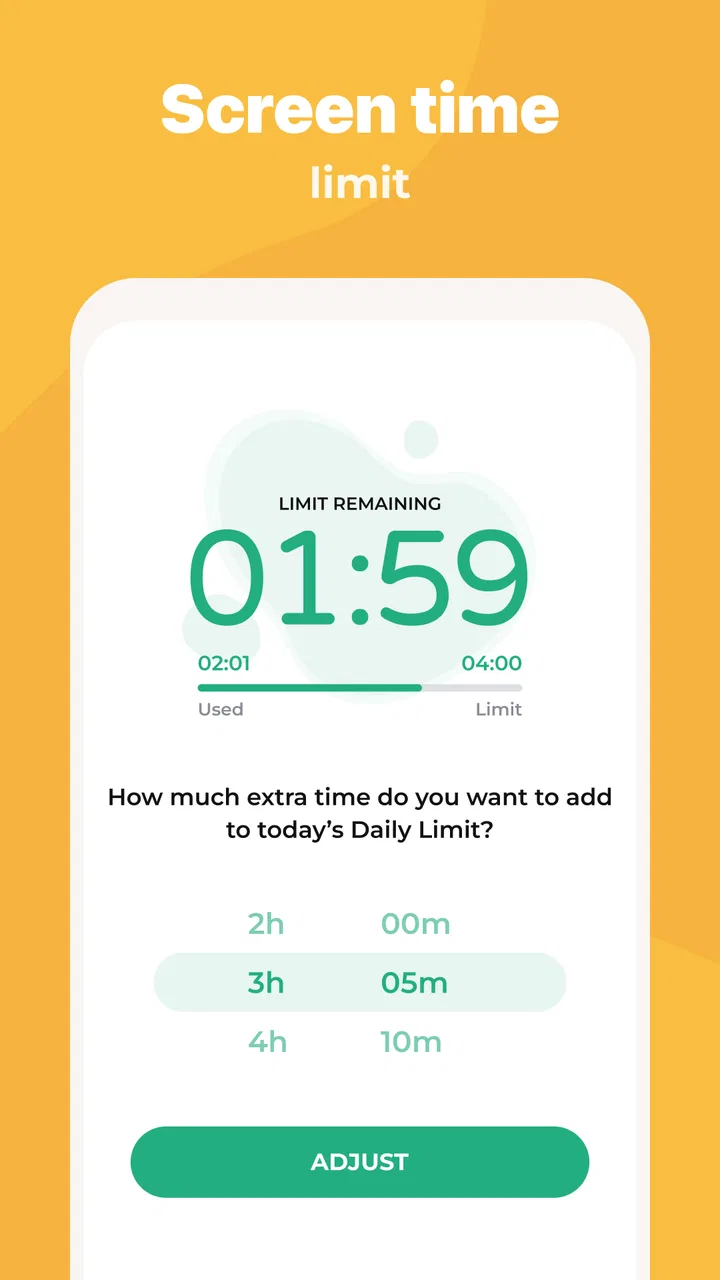
The central controls are easy to understand: decide when screen use is acceptable, restrict selected apps or games, and use monitoring tools when more oversight is needed. For a family that has never used parental controls, this is a more manageable starting point than trying to combine separate device settings, app-store restrictions, and manual timers.
I would especially consider it for a child who repeatedly moves from homework to games, stays online after bedtime, or finds ways to spend unplanned time in entertainment apps. Kidslox gives the parent a single place to establish a rule and apply it consistently. That consistency is more valuable than having a long list of advanced controls that nobody remembers to maintain.
A realistic school-night routine
Imagine a child returning home with a tablet. The parent wants educational apps available while homework is being completed, but does not want games and distracting entertainment available throughout the evening. With Kidslox, the parent can use app restrictions as part of the routine rather than relying on repeated reminders. Later, a screen-time limit can help signal that the evening is ending instead of leaving the child to decide when to stop.
That workflow is helpful because it separates two problems that are often confused. A time limit answers “how long should the device be used?” Blocking answers “which activities are acceptable right now?” A child may spend a permitted hour on a game when the parent intended that time for reading, so using only a timer is not always enough. Conversely, blocking every distracting app does not teach the child how to stop using a permitted one.
I also see value in using the app during transitions: the first weeks of a new school term, a holiday when routines become loose, or a move from a shared family tablet to a personal phone. The controls can provide a temporary structure while the family agrees on longer-term expectations.
Where the monitoring promise needs careful interpretation
The word “monitor” can mean different things to different parents. Some expect a simple overview of device use; others expect detailed content inspection, location tools, message access, or alerts about every activity. I would not choose Kidslox based on the word alone. Before relying on it for a specific safety concern, I would check the current controls inside the app and confirm that they match the kind of supervision the family actually needs.
For ordinary screen-time management, the app’s purpose is clear. For serious safeguarding concerns, it should be treated as one layer of a wider plan that includes device settings, age-appropriate communication, and direct adult involvement. A control that blocks access can reduce exposure, but it cannot explain why a particular website, conversation, or app may be risky.
What the current version tells me about the product
The current version is 10.9.3, and the app has been available since August 21, 2015. That long presence matters because parental-control software has to deal with changing operating systems, new app habits, and parents who expect controls to remain understandable over time. I read the current version as evidence of an established product rather than a brand-new experiment.
At the same time, a version number alone does not prove that every family will experience a flawless setup. Parental controls depend on the parent device, the child device, the operating system, and the way permissions are configured. Updates can also change where options appear or how a restriction behaves. My advice is to test the setup with a non-sensitive routine first: apply a modest limit, check the child device, and make sure the result matches what you intended before using it for bedtime or school-critical rules.
Changes and product maturity without overpromising
The clearest verified sign of evolution is the current 10.9.3 release within a product that has been maintained since 2015. That combination suggests ongoing development and adaptation, but it does not tell me that a particular feature was added in a particular update. I would avoid assuming that the newest version changes the app’s philosophy. Its foundation remains the same: parents set boundaries around time, apps, games, and supervision.
For existing users, the practical benefit of staying current is usually continuity. A maintained app is more likely to remain usable as phones and tablets change than an abandoned utility. However, updating is not a substitute for checking settings. After an update, I would review the child profile, limits, blocked items, and any device connection before assuming that the household routine is unchanged.
This is one of the less obvious trade-offs with a mature parental-control app. Familiarity can make daily management easier, but accumulated settings can also become confusing. If a family has changed devices or children’s routines several times, it is worth cleaning up old rules rather than adding another exception. A simple rule that everyone understands is often more effective than a complicated collection of overrides.
Working with more than one child or device
Families with several children should think about whether they want identical rules or individual routines. A younger child may need stronger restrictions, while an older child may need more flexible limits tied to schoolwork and independence. Applying one blanket policy can create unnecessary conflict, especially when the children use different devices or have different responsibilities.
My practical suggestion is to begin with the smallest useful setup. Create a clear routine for one child and one device, observe where the friction appears, and then extend the approach. This makes it easier to identify whether a problem comes from the rule itself, the device connection, or a misunderstanding about what should be available.
Another useful habit is to explain temporary changes before making them. If a child needs extra device time for a school project, a parent should state why the exception exists and when the ordinary routine returns. Otherwise, the child may see every adjustment as evidence that the original boundary was negotiable. Kidslox can help enforce the decision, but the family still has to communicate it.
Cost, access, and the point where families should pause
The app is free, but it includes in-app purchases ranging from $0.99 to $129.99 per item. That is a broad range, so I would not assume that every useful control is included at no cost. Before building a household routine around the service, I would inspect the purchase screen carefully, identify which functions are available in the free experience, and confirm whether the payment model fits the family’s budget.
This matters because parental controls are difficult to replace halfway through a routine. If a family begins with one system and later discovers that its preferred tools require payment, switching can be disruptive. I would treat the free installation as an opportunity to test the workflow, not as proof that the complete experience will remain free.
The minimum operating-system requirement is version 10. That makes compatibility an important first check for anyone using an older phone or tablet. A parent may have a newer device while a child uses an older hand-me-down, so both devices should be checked before spending time on setup. Compatibility is especially important in families that rely on a shared tablet for homework and entertainment.
Where Kidslox is stronger than ordinary device settings
Built-in screen-time tools can be perfectly adequate for a parent who wants a basic daily limit and does not need a separate parenting interface. They also have the advantage of being part of the operating system. Kidslox makes more sense when the family wants a dedicated parenting workflow centered on restrictions, app and game access, and monitoring rather than a general device-settings menu.
The advantage is not that every household needs more controls. It is that a dedicated app can make the parent’s intention more visible: this is the place where we manage the child’s device routine. That can be useful when several family members share responsibility for rules or when a parent wants a consistent method across more than one child’s device.
The trade-off is another account, another app to maintain, and another layer between the parent and the operating system. If all you need is a simple bedtime limit on one compatible device, the built-in option may be less complicated. I would choose Kidslox when its broader parenting focus solves a real coordination problem, not merely because it offers more buttons.
Important gaps and situations where I would skip it
I would hesitate to recommend it as the only tool for a teenager who needs detailed digital-safety education rather than strict blocking. Older children may respond better to negotiated rules, transparent explanations, and gradually increasing independence. A heavily controlled setup can become a contest between the parent and child, particularly if the child feels watched without understanding the reason for each restriction.
I would also skip it if the family cannot consistently maintain the parent side of the system. A rule that is changed every night, forgotten during weekends, or overridden without explanation will not create a reliable routine. In that case, a simple family agreement paired with the device’s native tools may be more realistic.
Another limitation is the possibility of setup friction. Any parental-control app has to be installed and configured correctly on the relevant devices. If the child uses several phones, tablets, or accounts, the parent should allow time to verify each one. I would not wait until bedtime to discover that a limit applies to one device but not another.
Privacy also deserves a thoughtful conversation. Parents should explain what kind of oversight is being used and why, especially with older children. Monitoring without boundaries can damage trust. Kidslox may help a parent enforce access rules, but it does not decide what level of observation is ethically appropriate for a particular family.
Questions I would answer before installing
If you are wondering whether it works for both Android and iOS habits, the safer approach is to check the compatibility of each device and the current app requirements before setup. The service is intended as a parenting app, but a household with mixed devices should never assume that every control behaves identically across platforms.
If you are asking whether it replaces talking to your child, my answer is no. I would present the limits as part of a family routine and explain how exceptions work. The app can enforce a decision after it has been made; it cannot create agreement by itself.
If you want to know whether the free version is enough, I would test the exact controls you need before depending on it. Because purchases are available across a wide price range, the important question is not whether installation costs anything, but whether the required combination of limits, blocking, and monitoring is included in the experience you plan to use.
If you are concerned about an older device, check the minimum operating-system requirement of version 10 on every phone or tablet involved. A parent device that meets the requirement does not automatically make an older child device suitable.
Finally, if you want detailed supervision rather than basic boundaries, define “monitoring” in practical terms first. Decide whether you need time summaries, app restrictions, content oversight, or something else, then compare that need with the controls currently visible in Kidslox. This prevents disappointment caused by choosing an app for a broad label rather than a clearly defined task.
What I would watch as the app continues to evolve
For a product with a long history and a current version of 10.9.3, I would watch how clearly future updates communicate changes to parents. The best evolution would preserve simple daily management while making exceptions, device changes, and rule reviews easier to understand. Parents need confidence that an update will not quietly turn a familiar routine into a confusing one.
I would also watch the balance between strict control and growing independence. Younger children often benefit from firm limits, while older children need a path toward self-management. A strong parental-control experience should make it possible for families to loosen restrictions thoughtfully rather than forcing an abrupt switch from heavy supervision to no structure.
My final view is that Parental Control - Kidslox is most useful as a structured boundary-setting tool for families that want one dedicated place to manage screen time, apps, games, and parental oversight. Its free entry point, established history, Everyone age rating, and broad adoption make it worth testing, while the in-app purchase range and device compatibility requirement deserve attention before committing.
My recommendation is to use it as a family routine, not as a substitute for parenting. Start with one clear problem, test the rule on the actual child device, explain the reason behind it, and review the setup after a week. If that process reduces arguments and makes expectations predictable, Kidslox can earn a useful place in the household. If your needs are limited to one basic timer, built-in controls may be simpler; if you need intensive safeguarding or detailed oversight, you should compare its current tools with more specialized alternatives before relying on it.
FAQs for Parental Control - Kidslox
01What is Kidslox and how does it work?
Kidslox is a parental control app designed to help parents manage their children's screen time and digital activities. It allows you to block or allow specific apps, set daily screen time limits, and monitor usage. With features like app blocking, scheduling, and a simple user interface, it aims to promote balanced device usage for kids.
02Is Kidslox compatible with multiple devices and platforms?
Yes, Kidslox supports multiple devices and is compatible with both Android and iOS platforms. You can manage and monitor multiple devices from a single account, making it convenient for families with different types of smartphones and tablets. This cross-platform compatibility ensures seamless control across all your children’s devices.
03How secure is Kidslox in protecting my family's privacy?
Kidslox takes privacy seriously and implements strong security measures to protect user data. It does not collect unnecessary personal data and uses encryption to safeguard information. Parents can rest assured that their family’s digital activities and personal information are kept private and secure with Kidslox.
04Can Kidslox help improve my child’s digital habits?
Absolutely. Kidslox is designed to encourage healthier digital habits by setting reasonable screen time limits and blocking distracting apps during homework or bedtime. By providing a structured digital environment, Kidslox helps children develop better time management skills and reduces the temptation of excessive screen time.
05Is there a subscription fee for using Kidslox?
Yes, Kidslox offers a subscription-based model with different pricing plans depending on the features and number of devices you wish to manage. While there is a free version available, it has limited functionality. The premium plans offer more comprehensive features and better control options for a small monthly or annual fee.
Pros
- User-friendly interface for easy navigation.
- Supports multiple devices and platforms.
- Customizable screen time schedules.
- Real-time location tracking feature.
- Blocks inappropriate content effectively.
Cons
- Limited features in the free version.
- Some features require a stable internet.
- Occasional app crashes reported.
- Setup can be complex for non-tech users.
- Limited customer support availability.

Parental Control - Kidslox
Gallery